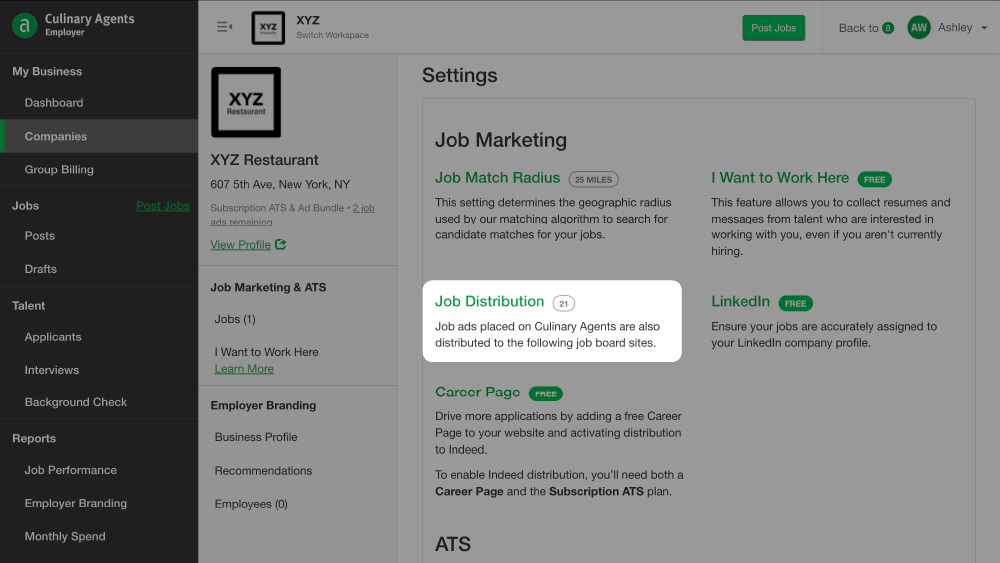
When you place Job Ads on Culinary Agents, we also distribute your jobs to third party partner sites to attract candidates. If you wish, you may limit where your jobs are distributed.
How-to Edit Job Distribution Settings - Job Boards
- Log in to Culinary Agents
- Click "Employer" on the upper right corner of the website
- Click "Companies" from the left navigation bar
- Click on "Settings" found underneath the business name
- Scroll down to the "Job Distribution" section
- Click on "Update Distribution Preferences"
- Toggle on/off the specific job board(s)
- Click "X" in the upper right corner of the pop-up window
How-to Edit Job Distribution Settings - Social Media (LinkedIn)
- Log in to Culinary Agents
- Click "Employer" on the upper right corner of the website
- Click "Companies" from the left navigation bar
- Click on "Settings" found underneath the business name
- Scroll down to the "Social Media" section within "Job Distribution"
- To update distribution to Social Media, click on "Add LinkedIn Profile" (or "Edit" if one is already linked to your account) in that section
- Manually type or copy/paste the URL for company's LinkedIn Profile
- Click "Save"
How-to Edit Job Distribution Settings - Career Page
- Log in to Culinary Agents
- Click "Employer" on the upper right corner of the website
- Click "Companies" from the left navigation bar
- Click on "Settings" found underneath the business name
- Click "Career Page" in the grey left hand navigation menu
- Create/Update your Career Page on the next page. (To learn more about Career Pages, click here)
Related Articles:


