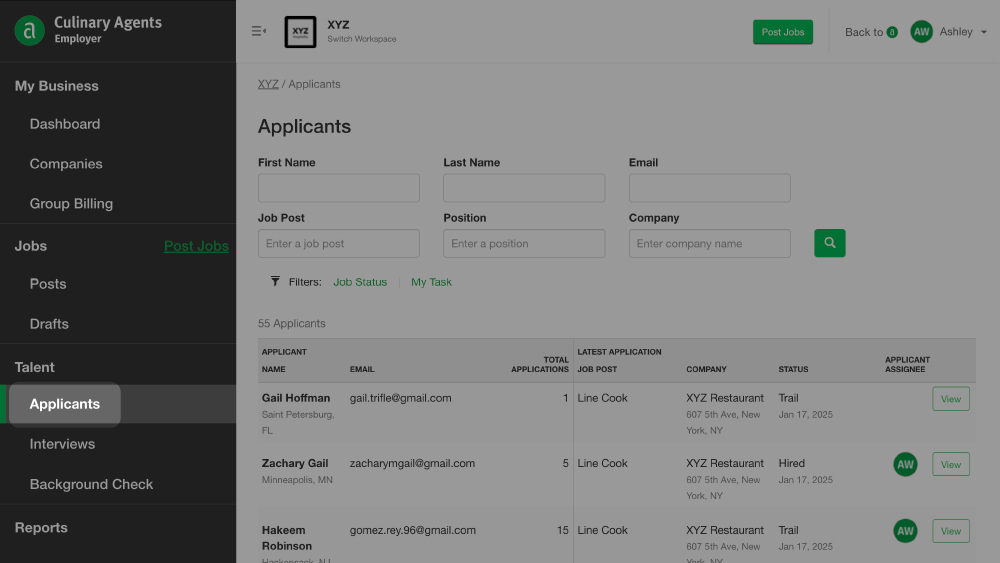
The "Talent" section is designed to help you easily manage candidates related to your Job Posts, Job Ads and "I Want To Work Here" submissions. If you have access to multiple business profiles and/or are an Admin of a Group, this section allows you to have an overview of all candidates related to your business profiles.
In the “Talent” section, you can easily:
- Search applicants
- Access applicant data
- Manage applicants
- Export hired applicant data*
To access "Talent" via the "Employer Menu"
- Log in to Culinary Agents
- Click "Employer" on the upper right corner of the website
- Click your desired subsection of "Talent" from the left navigation bar: "Applicants", "Background Check" or "Export Hires"
Applicants
To easily locate an applicant, begin typing in the name, email, job post title, position and/or company name. You may also refine your search for applicants by filtering your results (e.g., Job Status, My Tasks).
Applicant Search Filter Options
Job Status
- Open: Jobs that are active and accepting applications
- Closed: Jobs that are active, but no longer visible to the public and not accepting applications
- Recently Expired: Jobs that have expired within the last 90 days
- Archived: Jobs that have expired for longer than 1 year
My Tasks
- Assigned to me: Jobs in which you are the main point person
- Following: Jobs in which you receive updates when there are unread applicants
Applicant Data Access
Click “View” to the right of the corresponding applicant. From your dashboard, you’ll then be able to access the individual Overview for each applicant which includes:
- A summary of applications to jobs and “I Want To Work Here” submissions
- Details about Active Applications, "I Want To Work Here", and Invited to Apply
- Internal communications (e.g., flags, notes)
Export Hires*
This feature allows you to export data for new hires as a CSV file for importing to 3rd party payroll systems (e.g., Paycom).
Pro-tips:
- If you are a Group Admin (for multiple businesses linked to group profiles), the overview from the main page is organized for the selected Group. To switch between groups, select from the drop down menu in the "Current Group" section on the left.
- Your view is based on your access level, which may vary per business profile.
Business Profile Admins have access to all job, candidate and reporting data.
Business Profile Managers have access to jobs, candidate and reporting data linked to jobs in which they are the Assignee or Follower of.
For more details, click here. - For a directory of tutorials for utilizing Culinary Agents for your business, click here.
* Indicates premium features available with ATS upgrade. To learn more about ATS upgrades, contact our team.
Related Article: How-to: Manage Your Applicants


